Product Overview
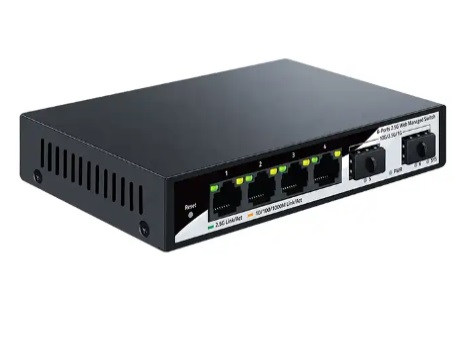
This compact, high-performance switch features 4× 2.5G RJ45 ports and 2× 10G SFP+ uplinks. With a 60Gbps switching capacity, VLAN and QoS support, and a fanless metal chassis, it’s ideal for home labs, NAS setups, and high-speed workstations. Powered by the Realtek RTL8372 switch controller, it delivers stable multi-gigabit performance with advanced traffic management features.
Important Notice
⚠️ Speed Disclaimer: To achieve the advertised speeds of up to 2.5Gbps/10Gbps, your internet service and network hardware must support multi-gigabit throughput. This includes a compatible router, switch, and ISP plan. Performance may be limited if connected to standard 1Gbps infrastructure.
Technical Specifications
- Ports: 4× 100/1000/2500M RJ45 + 2× 10G SFP+
- Switching Capacity: 60Gbps
- Controller: Realtek RTL8372
- Standards: IEEE 802.3x, 802.1Q, 802.3az
- Management: Web-based interface (browser login)
- VLAN: Access, Trunk, Hybrid modes; VID 1–4094; up to 31 static VLAN groups
- QoS: IEEE-compliant traffic prioritization
- Flow Control: Full duplex (802.3x), Half duplex (Back pressure)
- Link Aggregation: Static groups (2 max), 4 members per group
- Port Mirroring: Supported
- Auto MDI/MDIX: Yes
- Housing: Fanless aluminum alloy
Web Management Access
- Connect your PC to any RJ45 port.
- Set your PC IP to
192.168.2.x (e.g., 192.168.2.100).
- Open browser and go to
192.168.2.1
- Login (default credentials:
admin / admin)
- Configure VLANs, QoS, port settings, and more
Common Use Cases
- 🔗 Link aggregation for NAS or servers
- 📶 WiFi 6/6E router uplinks
- 🎮 Low-latency gaming setups
- 📁 High-speed file transfers
- 🧪 VLAN segmentation for home labs
FAQs
- Does it support unmanaged mode? No — it is web-managed only.
- Can I use 1G or 100M devices? Yes — ports auto-negotiate speeds.
- Is it fanless? Yes — silent aluminum housing.
- Can I use DAC cables in SFP+? Yes — supports DAC, AOC, and fiber modules.
- Does it support inter-VLAN routing? No — this is a Layer 2 switch. Use a Layer 3 router or firewall for routing between VLANs.
Support
For additional assistance, contact us at: support@digitaldevices.ca